This is Sasha and thanks for joining me here for another CSS training video and today what I’d like to do is take a look the ID attribute and show you how to apply the IDs within your personal or business page. If you’re editing your business website, this is extremely helpful to understand what’s going on and happening underneath the surface. Let’s take a quick look.
--------------------- HTML CODE --------------------------------------- CSS CODE ------------------ body { background: #ccc;} h3 { background:white; border: 1px solid #000; width: 420px; padding: 15px 10px; margin: 25px auto 25px auto; }Backstageincome : Learn to grow a business and evolve your life! These are my books and products
These are my books and products
These are my books and products
Thank you for visiting

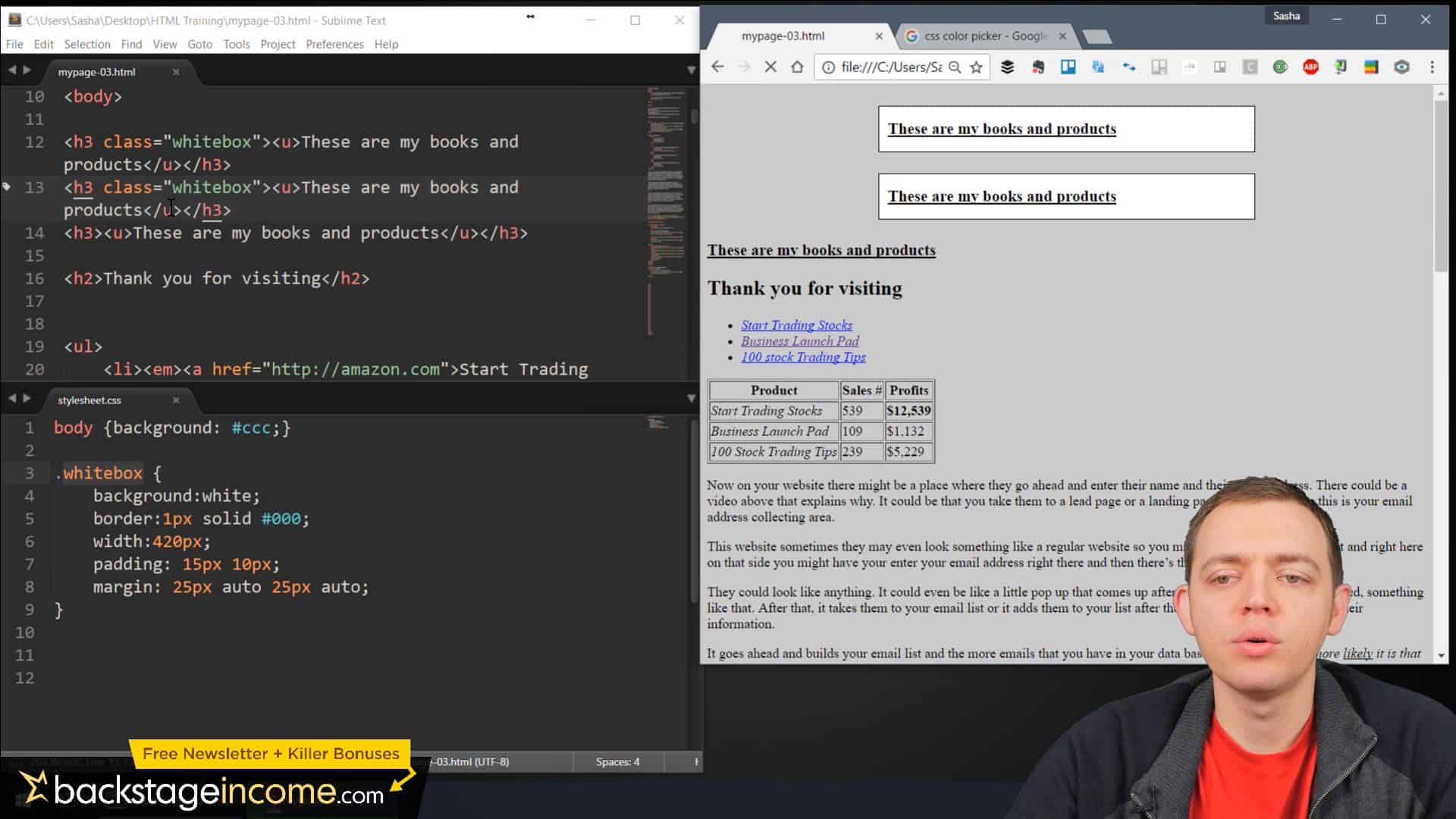
If you take a look at my page right here, what I have is three boxes which are the H3 tag boxes. Now if you want to go ahead and add a class to them, I’m going to say white box. This is how you typically do a class and you can see right now the box went away. I need to go ahead and add the class attribute, we’ll say white box and you can see that now I’ve added it to one and it went ahead and styled it based on that. I can go ahead and do the same thing to the second one if that’s what I want to do and reuse that time and time again.
--------------------- HTML CODE --------------------------------------- CSS CODE ------------------ body { background: #ccc;} .whitebox { background:white; border: 1px solid #000; width: 420px; padding: 15px 10px; margin: 25px auto 25px auto; }Backstageincome : Learn to grow a business and evolve your life! These are my books and products
These are my books and products
These are my books and products
Thank you for visiting
The ID vs. the Class attribute
The thing about using the ID attribute is it’s a little bit different. Say for example you have a unique properties and unique stylings you want to add in, typically this is used more for like, let’s say, a navigation menu or a footer, you know, things that aren’t reused time and time again. It could be even for headers like at the very top contact information. You might want to do this because these are unique. The way that you write them is instead with a period, use the number sign and I could say, “Well, this is my blue
You might want to do this because these are unique. The way that you write them is instead with a period, use the number sign and I could say, “Well, this is my blue navi.” Okay, blue navigation box. I’ll start it off kind of the same way and what I’ll do is I’ll just copy and paste the same code for the time being as I did on my other one but let’s just change the color. We’ll do something a little more blue, okay? We’ll do kind of this background right here. We’ll do the background blue. We’ll make the border a little bit darker like this, okay? The width, we’ll make it, let’s say, 620. I’ll go ahead and hit save.watch what’s going to happen here is that this is going to create a box but we first need to tie this in. How do I do that? Well, instead of using
Watch what’s going to happen here is that this is going to create a box but we first need to tie this in. How do I do that? Well, instead of using class, you go ahead and type the ID attribute. You could see right there, it pops up ID, it’s an attribute. We go ahead and now what I can do is type in blue navi if this was the navigation, hit save and now it’s going to link that right in there.
--------------------- HTML CODE --------------------------------------- CSS CODE ------------------ body { background: #ccc;} .whitebox { background:white; border: 1px solid #000; width: 420px; padding: 15px 10px; margin: 25px auto 25px auto; } #bluenavi { background: #2a73c1; border: 1px solid #2b619b; width: 620px; padding: 15px 10px; margin: 25px auto 25px auto; }Backstageincome : Learn to grow a business and evolve your life! These are my books and products
These are my books and products
These are my books and products
Thank you for visiting

ID attributes are not reusable
You can see how now this is unique. The difference here, of course, is you don’t want to reuse this on the same page again. If you had like the H2 tag, you don’t want to use blue navi again. In theory, you can, okay? It’ll work but it’s not really the appropriate way to do it.
You could reuse it, you know, on another page but use it only one time per page. And again like I said, it’s typically for things like navigation, you know, and it’s a way for you to quickly see, “Oh okay, this is its own element. It’s separate.” I typically use for things like a navigation. I will use it for things like a footer or a header. It might be for a tag line or slogan that’s reused throughout the pages. But it’s specific for that. It’s reused over and over again.
--------------------- HTML CODE --------------------------------------- CSS CODE ------------------ body { background: #ccc;} .whitebox { background:white; border: 1px solid #000; width: 420px; padding: 15px 10px; margin: 25px auto 25px auto; } #bluenavi { background: #2a73c1; border: 1px solid #2b619b; width: 620px; padding: 15px 10px; margin: 25px auto 25px auto; }Backstageincome : Learn to grow a business and evolve your life! These are my books and products
These are my books and products
These are my books and products
Thank you for visiting

Then what you can do is you know that this element is specific to that blue one. You could say, “Okay. Well, I want the text color to be white so I’ll go ahead and do it that way.” You know, and you could play with that property because it’s specifically styled to that.
--------------------- HTML CODE --------------------------------------- CSS CODE ------------------ body { background: #ccc;} .whitebox { background:white; border: 1px solid #000; width: 420px; padding: 15px 10px; margin: 25px auto 25px auto; } #bluenavi { color: #fff; background: #2a73c1; border: 1px solid #2b619b; width: 620px; padding: 15px 10px; margin: 25px auto 25px auto; }Backstageincome : Learn to grow a business and evolve your life! These are my books and products
These are my books and products
These are my books and products
Thank you for visiting

You use it exactly the same way as the class element except an order to link it, use the ID equals and then you type it in. To link it in the CSS, you use the number sign rather than using the period in front. That’s how you go about doing it in using the ID attributes without – within your code or within your website.


